CIMNotebook for VS Code
The VS Code extension gives you real-time SPARQL and SHACL validation against CIM / CGMES schema profiles directly in the editor. It is a thin client around CIMLangServer: the extension registers the file types and settings, and the server provides every diagnostic, hover, completion, and definition.
Requirements
- Java 21 or later on your
PATH(or configured viacimnotebook.javaExecutable). The extension launches the language server as a Java process. - VS Code 1.75 or later.
Install

Install from the Visual Studio Marketplace: open the Extensions view, search for CIMNotebook, and click Install — or from the command line:
code --install-extension soptim-ag.cimnotebook
Alternatively, install from a packaged .vsix:
code --install-extension cimnotebook-<version>.vsix
Or from the VS Code UI: open the Extensions view, click the ... menu → Install from
VSIX…, and pick the file. Reload the window if prompted.
There is no bundled default schema. Open a .rq, .sparql, .ttl, or .shacl file to activate
the extension, then point it at your profiles with an
opencgmes.jsonc — run CIMNotebook: Create Config File from the
Command Palette to scaffold one. Without a schema, validation is syntax-only.
Features
Syntax highlighting
Grammar-based highlighting for SPARQL (.rq, .sparql) and SHACL / Turtle (.ttl,
.shacl).
Real-time diagnostics
Every open document is validated against the loaded schema and findings appear as squiggly underlines — unknown classes and properties, syntax errors, domain/range mismatches, datatype conflicts, and invalid SHACL cardinalities. The complete list of codes and severities is on the Validation checks page.

Hover documentation
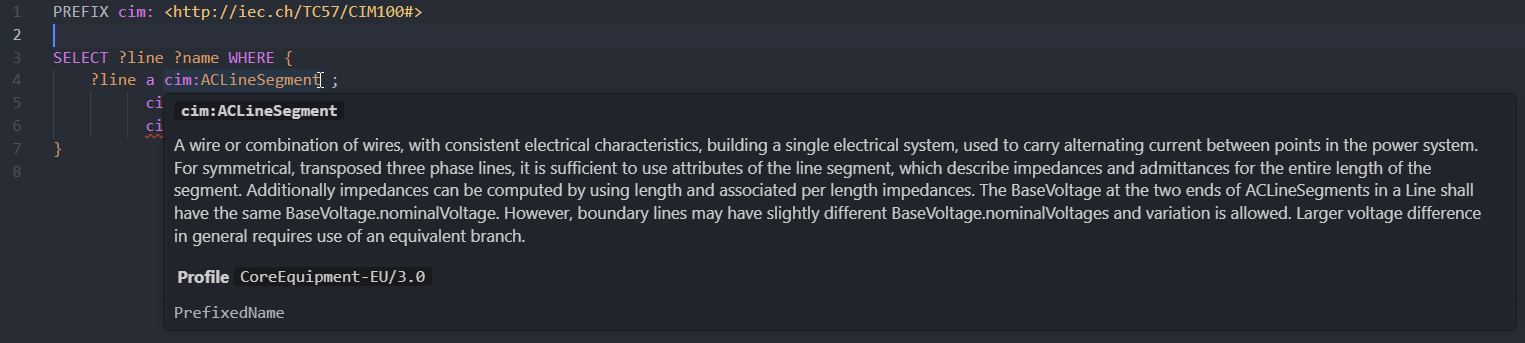
Hover over any CIM term (e.g. cim:ACLineSegment) to see its full IRI, its rdfs:label and
rdfs:comment, and its rdfs:domain / rdfs:range and declaring profile(s) — read straight from
the loaded schema.
Auto-completion
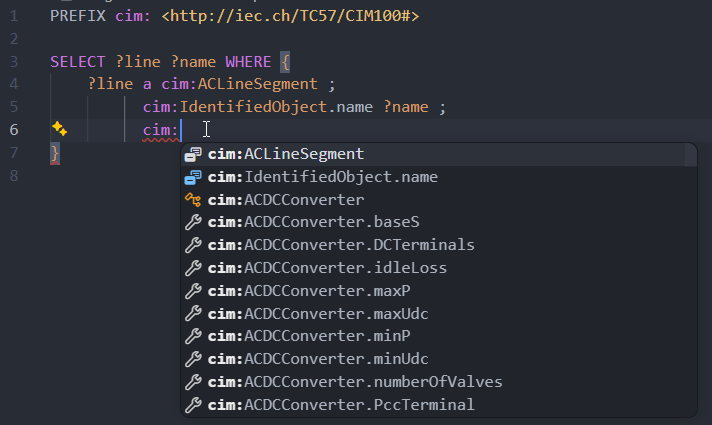
Typing : after a prefix (e.g. cim:) suggests all classes and properties in the loaded schema.
In object position after an enumeration-ranged property, the enumeration's members are suggested
(e.g. cim:WindGenUnitKind.offshore). Typing after a standard-vocabulary prefix (rdf:, rdfs:,
owl:, sh:) suggests that vocabulary's terms (e.g. sh:minCount, sh:NodeShape, rdf:type), so
SHACL shapes and SPARQL queries complete the same way.
Go-to-definition
Press F12 or Ctrl+Click on any CIM IRI to jump directly to its declaration line in the source
.rdf or .ttl profile file.
Workspace symbol search
Press Ctrl+T (Cmd+T on macOS) and type a CIM class or property name to navigate to any schema
term across the workspace. Matching is partial and case-insensitive — aclineseg matches
ACLineSegment.
CIM Notebooks
CIMNotebook opens git-friendly markdown notebooks (*.cimnb.md, or any *.md via
Open With…) whose ```sparql / ```shacl code blocks become notebook cells,
and reads/writes Zazuko's .sparqlbook format for interop. The command
CIMNotebook: Convert Notebook switches a notebook between the two formats. Cells run
against SPARQL endpoints, local RDF/CIMXML files, or named connections — the cell's
status-bar button and CIMNotebook: Set Cell Endpoint… pick the target, and
CIMNotebook: Set/Clear Connection Credentials… manage basic-auth secrets. See
CIM Notebooks.
Configuration sidebar
The CIMNotebook icon in the activity bar opens three native, collapsible sections for
the workspace's opencgmes.jsonc: Connections,
Validation (strictness, standard-vocabulary check, schemas directory, schema files),
and Notebook Execution (query timeout, max rows). Each row shows its current value —
click a row to edit it with a QuickPick or input box, use the + button in a section's
title bar (or on Schema files) to add an entry, and hover a row for inline edit /
remove / set-default / credentials actions. Adding a schema file or a connection's data
file offers fuzzy, search-as-you-type file matching over the workspace, with a
Browse… fallback for files outside it. Every edit patches only the changed value
through the same comment-preserving path edits as hand-editing, so the sidebar and manual
changes to the file coexist. Without a config file yet, the sections show a Create
Config File prompt instead. The sections follow the active document's nearest config,
the same discovery validation uses — the Connections section header shows which
config file that is.
SPARQL Notebook support
CIMNotebook validates SPARQL cells inside notebook documents — its own CIM Notebooks as well
as third-party
SPARQL Notebook
documents — not just .rq / .sparql files. Each cell is validated independently, and a cell can
declare its own schema with a # [endpoint=...] directive. See
SPARQL Notebooks for the full behaviour.
Settings
These editor-specific settings live in VS Code's settings (settings.json or the Settings UI).
Schema configuration itself lives in opencgmes.jsonc, not here.
| Setting | Default | Description |
|---|---|---|
cimnotebook.serverJar | (bundled) | Absolute path to cimvocabcheck-lsp.jar. Leave empty to use the JAR bundled with the extension. |
cimnotebook.javaExecutable | java | Java executable used to launch the language server. Must be Java 21 or later. |
cimnotebook.javaArgs | [] | Extra JVM arguments passed before -jar, e.g. ["-Xmx512m"]. |
cimnotebook.trace.server | off | LSP message tracing. Set to messages or verbose to debug communication with the server. |
Changing a server-launch setting (serverJar, javaExecutable, javaArgs) requires a window
reload — VS Code prompts you to reload when one changes.
The CIMNotebook: Show Output command opens the extension's output channel, the first place to look when diagnosing startup or schema-loading issues.
Building the VSIX
The extension bundles the language server JAR, which is produced by the cimvocabcheck-lsp Maven
module. From a checkout:
# 1. Build the language server fat JAR
mvn -f cimvocabcheck/lsp/pom.xml package -DskipTests

# 2. Build and package the extension into a .vsix
cd cimnotebook/vscode
npm install
npm run copy-jar    # copies the built cimvocabcheck-lsp jar into server/
npx vsce package    # bundles (via the prepublish step) and produces the .vsix
The resulting cimnotebook-<version>.vsix can be installed with
code --install-extension.
Troubleshooting
Common VS Code issues — no diagnostics, Java not found, the .ttl language-mode conflict, schema
load failures — are collected on the Troubleshooting page.