SPARQL Notebooks
In VS Code, CIMNotebook validates SPARQL cells inside notebook documents, not just
.rq / .sparql files — both in CIMNotebook's own CIM Notebooks
and in third-party
SPARQL Notebook
documents. Each cell is validated independently as you edit it, and a cell can name the schema it
should be checked against with the endpoint directive described below.
SPARQL Notebook cell validation is a VS Code feature. The IntelliJ plugin
validates .rq, .sparql, .ttl, and .shacl files but does not validate notebook cells.
Per-cell validation
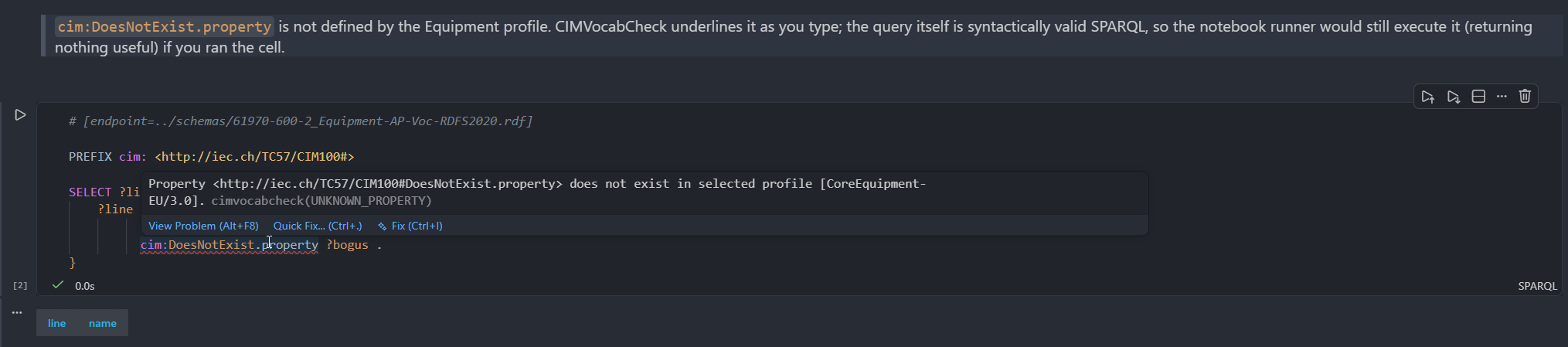
Open a SPARQL Notebook and each SPARQL cell is forwarded to CIMLangServer as its own document. You
get the same diagnostics, hover, and completion you would in a standalone .rq file — scoped to
that one cell.
The # [endpoint=...] directive
A cell can point at the schema to validate against with a SPARQL Notebook endpoint directive on its first line:
# [endpoint=./schemas/cgmes-3.0/EquipmentCore.ttl]
SELECT * WHERE { ?s a cim:ACLineSegment }
The directive names where the CGMES schema lives — never live instance data. There are three cases:
-
Local file(s) (
./relative/path.ttl,.rdf,.owl) — the file is loaded as the schema for that cell. Relative paths resolve against the notebook's own directory. Several directives — or a glob pattern — load the union of the files, so one cell can validate against multiple profiles at once:# [endpoint=./schemas/cgmes-3.0/EquipmentCore.ttl]# [endpoint=./schemas/cgmes-3.0/Topology.ttl]or, equivalently, with glob (
*) and alternative ({a,b}) patterns:# [endpoint=./schemas/cgmes-3.0/*.ttl]# [endpoint=./schemas/cgmes-3.0/{EquipmentCore,Topology}.ttl] -
Remote SPARQL endpoint (
http(s)://…) — CIMNotebook loads the schema from the endpoint itself, enumerating the named graphs that hold the CGMES profiles and reading them into the schema index. The schema is fetched in the background; diagnostics appear once it has loaded. -
No directive — the cell falls back to the workspace schema (the nearest
opencgmes.jsonc), exactly like a.rqfile; with no schema configured, it is checked syntax-only.
A remote endpoint is typically an Apache Jena Fuseki server with the RDFS profiles loaded in per-profile named graphs. CIMNotebook validates against that schema and never queries live instance data. For how the server connects to and reads a remote endpoint, see Endpoints.
How a cell resolves its schema
Known limitations
Loading a schema from a remote SPARQL endpoint assumes the CGMES profiles are stored in
per-profile named graphs (graphs that declare rdfs:Class / owl:Ontology); instance-data
graphs are skipped. Endpoints that store the whole schema in the default graph, or mix it with
instance data in one graph, are not supported.
A schema loaded from an endpoint is cached for the session. To re-fetch it, edit opencgmes.jsonc
(which triggers a reload) or reload the window. Diagnostics, hover, auto-completion, and
go-to-definition are all endpoint-aware; because there is no local file, go-to-definition on an
endpoint term opens a generated read-only Turtle "peek" of the term fetched from the endpoint.